# Rigel CMS
URL: https://rigelcms.dev
## Visual CMS for Astro | Rigel CMS
URL: https://rigelcms.dev
Rigel CMS is an open-source visual editor for Astro. Edit website copy and articles, preview changes, and publish through GitHub. Your content stays in Git.
# Your website.
Your words.
A visual CMS for Astro.
Your content stays in Git.
Prepare editable areas in your Astro site. Then change text, images and articles on the page, without handing over the code.
[Set up Rigel](/docs/getting-started/)[Try the live demo](https://demo.rigelcms.dev/rigel/)
No sign-in needed. Play with the editor; changes reset when you refresh.
Rigel CMS 1.6.1 fixes intermittent GitHub publishing failures, including premature merge errors and misleading permissions messages. [Read the release notes](/changelog/v1.6.1/).
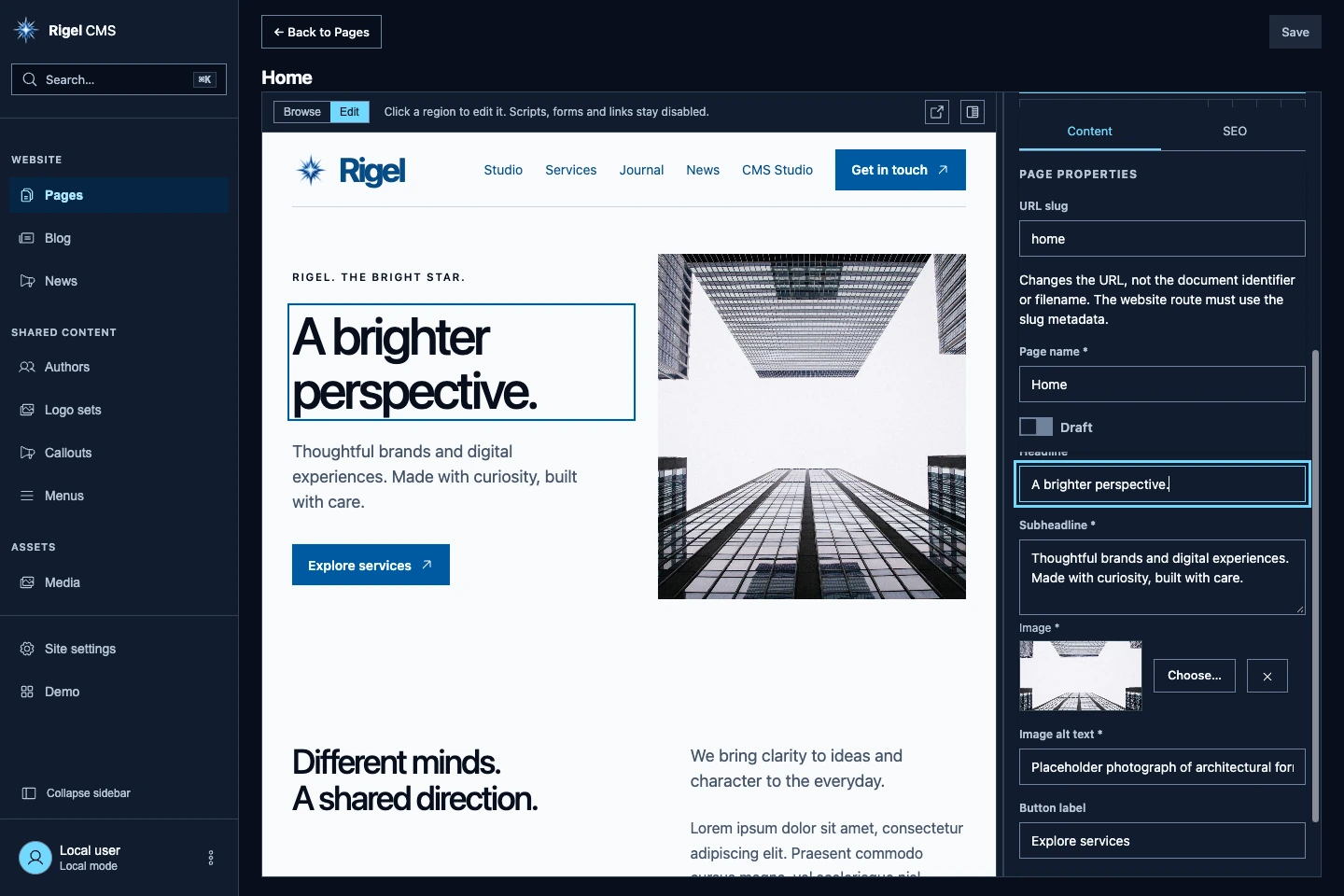
Rigel CMS, editing the Astro starter.
## An editor for your content.
Not another website builder.
You build the layouts and choose what can change. Rigel gives editors a prepared website preview, structured fields and a media library.
Unsaved changes stay in the editor. Save writes content; publishing follows your Git workflow and static build. Your public website does not need a CMS database to render a page.
[See how content is structured](/docs/content-model/)
## Start with your own repository.
Use the [Astro starter](https://github.com/rigel-cms/rigel-starter) or add the integration to an existing site. Prepare your templates, configure your content and keep the deployment you already use.
`pnpm add @rigel-cms/rigel@1.6.1`
[Read the installation guide](/docs/getting-started/)
## What's changing
[All updates](/updates/)
1. November 15, 2026
### [GitHub publishing hotfix](/changelog/v1.6.1/)
Rigel CMS 1.6.1 fixes premature merge errors and misleading permissions messages during GitHub publishing.
2. November 14, 2026
### [Content history, draft recovery and batch media uploads](/changelog/v1.6.0/)
Rigel CMS 1.6.0 adds recovery for interrupted edits, saved revision previews, content references and browser image processing.
---
## Acknowledgements | Rigel CMS
URL: https://rigelcms.dev/acknowledgements
The projects and maintainers behind Rigel CMS, including Phosphor Icons, Meta's Lexical, ProseMirror and the tools used by this website.
# Acknowledgements
Rigel CMS uses third-party software for editing and previewing website content. This page credits the projects used by the editor, this website and the shared authenticator. Components retain their upstream licenses.
## Phosphor Icons
Rigel's editor and this website use [Phosphor Icons](https://phosphoricons.com/), under the MIT license, copyright Phosphor Icons. The original notice is retained with the editor's icon assets.
## Lexical
Rigel's structured article blocks use [Lexical](https://github.com/facebook/lexical) and its code, history, link, list, rich-text and table packages. Lexical is MIT-licensed, copyright Meta Platforms, Inc. and affiliates.
## ProseMirror
The Markdown editor uses [ProseMirror](https://prosemirror.net/), including its commands, example setup, Markdown, model, list, state and view packages. These packages use the MIT license.
## Other CMS dependencies
- [DOMPurify](https://github.com/cure53/DOMPurify), by Cure53 and contributors: HTML sanitization for rendered content and previews. Available under MPL-2.0 or Apache-2.0.
- [markdown-it](https://github.com/markdown-it/markdown-it): Markdown parsing and rendering. MIT license.
- [Svelte](https://svelte.dev/) and its [Vite plugin](https://github.com/sveltejs/vite-plugin-svelte): the editor interface and build integration. MIT licenses.
- [Astro](https://astro.build/): website integration and static editor routes. MIT license.
- [Vite](https://vite.dev/): development and bundling. MIT license.
## Website dependencies
This website uses [Astro and its MDX, Markdown, RSS and sitemap integrations](https://github.com/withastro/astro), plus [Tailwind CSS](https://tailwindcss.com/). The website and authenticator use [Hono](https://hono.dev/); the public MCP endpoint uses the [MCP TypeScript SDK](https://github.com/modelcontextprotocol/typescript-sdk). These projects use MIT licenses.
- [Astro Search Plugin](https://github.com/freshjuice-dev/astro-search-plugin) and [Orama](https://github.com/oramasearch/orama): browser search, under Apache-2.0.
- [Astro Icon](https://github.com/natemoo-re/astro-icon) and the [Iconify Phosphor collection](https://icon-sets.iconify.design/ph/): website icons, under MIT.
- [table-saw](https://github.com/zachleat/table-saw): responsive tables, under MIT.
- [astro-llms-md](https://github.com/tfmurad/astro-llms-md): Markdown mirrors, under MIT.
- [Bicho JavaScript SDK](https://bicho.fyi/): authentication diagnostics, under Apache-2.0.
## Fonts and generated images
[General Sans](https://www.fontshare.com/fonts/general-sans) was designed by Frode Helland for the Indian Type Foundry and is distributed through Fontshare. We self-host it for this website and use it in generated preview cards. It is covered by the [ITF Free Font License](https://www.fontshare.com/licenses/itf-free-font-license), not an open-source font license.
The 404 arcade uses [Tiny5](https://github.com/Gissio/font_tiny5), copyright the Tiny5 Project Authors, under the [SIL Open Font License 1.1](/fonts/Tiny5-OFL.txt). The font and its license are self-hosted.
- [Satori](https://github.com/vercel/satori), by Vercel and contributors: layout for social preview cards. MPL-2.0 license.
- [satori-html](https://github.com/natemoo-re/satori-html): HTML input for Satori. MIT license.
- [resvg-js](https://github.com/yisibl/resvg-js): SVG rasterization for generated preview images. MPL-2.0 license.
- [sharp](https://sharp.pixelplumbing.com/): image resizing and compositing. Apache-2.0 license.
## Development and verification
- [TypeScript](https://www.typescriptlang.org/), by Microsoft and contributors: type checking. Apache-2.0 license.
- [DefinitelyTyped](https://github.com/DefinitelyTyped/DefinitelyTyped): Node.js and Markdown type definitions. MIT license.
- [Vitest](https://vitest.dev/): CMS unit tests. MIT license.
- [axe-core](https://github.com/dequelabs/axe-core), by Deque Systems and contributors: browser accessibility checks. MPL-2.0 license.
- [Wrangler](https://github.com/cloudflare/workers-sdk), by Cloudflare and contributors: local Worker development and build tooling. Available under MIT or Apache-2.0.
Development also uses [Node.js](https://nodejs.org/) and [pnpm](https://pnpm.io/). GitHub provides repository and authorization services; Cloudflare provides hosting. These services are distinct from the third-party software licenses listed here.
## Optional media sources
The editor can connect to [Pexels](https://www.pexels.com/), [Pixabay](https://pixabay.com/) and [Unsplash](https://unsplash.com/) when configured. Their image licenses, attribution requirements and API terms are separate from Rigel's software license. Availability of an image in a provider search is not a blanket permission to reuse it.
## Licenses and notices
This page highlights the directly used projects and their roles. Their dependencies can carry additional licenses and notices. Each component retains its own copyright and license; acknowledgement does not replace the notices required when distributing software or assets. Follow the upstream projects for their full license texts.
Rigel CMS's Apache-2.0 license does not relicense third-party code, fonts or icons. Project names and trademarks belong to their respective owners. These acknowledgements do not imply affiliation or endorsement.
---
## GitHub sign-in | Rigel CMS
URL: https://rigelcms.dev/auth-info
Connect Rigel to GitHub with our GitHub App or your own.
# Connect with GitHub.
GitHub is the only sign-in provider supported by Rigel's GitHub backend. You sign in through GitHub to give the editor access to your repository. Start the connection from your website's editor.
## Use our GitHub App
We provide the Rigel CMS GitHub App and authentication service at `https://auth.rigelcms.dev`. They are the default connection, so you do not need to register your own App to use this setup. Install the App on the repositories you want to edit and authorize it through GitHub.
## Or use your own
Our App is optional. You are free to register your own GitHub App and run a compatible authentication service. Set `authOrigin` and `appSlug` in your Rigel configuration to use them. Rigel does not restrict the connection to our App or service.
Start with the [GitHub auth template](https://github.com/rigel-cms/rigel-github-auth-template) for Cloudflare Workers, Netlify or Vercel. Its setup guide covers registering your App and configuring the service.
Your service must support Rigel's editor sign-in flow. Keep its client secret on the server, never in your website's JavaScript or public configuration.
## Repository access
Both options use your GitHub permissions and the App's installation permissions. A public repository allows public reads; saving and publishing still require write access. You can review or revoke an App's access in GitHub settings.
[Configure your GitHub connection](/docs/github-publishing/)
---
## Changelog | Rigel CMS
URL: https://rigelcms.dev/changelog
Release notes and upgrade information for Rigel CMS.
# Changelog
Release notes, newest first. [RSS](/changelog/rss.xml) · [JSON feed](/changelog/feed.json)
1. November 15, 2026
## [GitHub publishing hotfix](/changelog/v1.6.1/)
Rigel CMS 1.6.1 fixes premature merge errors and misleading permissions messages during GitHub publishing.
2. November 14, 2026
## [Content history, draft recovery and batch media uploads](/changelog/v1.6.0/)
Rigel CMS 1.6.0 adds recovery for interrupted edits, saved revision previews, content references and browser image processing.
3. November 8, 2026
## [Faster GitHub loading, media uploads and browser-assisted drafts](/changelog/v1.5.0/)
Rigel CMS 1.5.0 adds scoped content loading, persistent file caches, repository media writes and native WebMCP tools for unsaved editing.
4. November 1, 2026
## [Page templates, search and inline rich text](/changelog/v1.4.0/)
Rigel CMS 1.4.0 adds page-template selection, live content search, language-aware search preferences and block editing for native Markdown fields.
5. October 31, 2026
## [Section reordering and file fields](/changelog/v1.3.0/)
Rigel CMS 1.3.0 adds section drag handles, file fields, categorized pages and inline Markdown editing.
6. October 30, 2026
## [Default page navigation](/changelog/v1.2.2/)
Rigel CMS 1.2.2 keeps page document types together under Pages in the default sidebar.
7. October 29, 2026
## [Properties panel scrolling](/changelog/v1.2.1/)
Rigel CMS 1.2.1 fixes sticky tabs and scrolling in page and article properties.
8. October 29, 2026
## [Content languages](/changelog/v1.2.0/)
Rigel CMS 1.2.0 adds opt-in content-language filtering, explicit locale metadata and route-aware document slug validation.
9. October 28, 2026
## [Svelte extensions and interface languages](/changelog/v1.1.0/)
Rigel CMS 1.1.0 adds custom Svelte blocks, grouped toolbar actions and build-time interface language selection.
10. October 27, 2026
## [Initial public release](/changelog/v1.0.0/)
Rigel CMS 1.0.0 brings visual editing, structured content, article collections, a media library and GitHub publishing to Astro sites.
---
## Initial public release | Rigel CMS changelog
URL: https://rigelcms.dev/changelog/v1.0.0
Rigel CMS 1.0.0 brings visual editing, structured content, article collections, a media library and GitHub publishing to Astro sites.
# Initial public release
October 27, 2026
Rigel CMS 1.0.0 is the initial public release, available on [npm](https://www.npmjs.com/package/@rigel-cms/rigel/v/1.0.0). It adds a content editor at `/rigel/` while your Astro site keeps its own templates, content files and deployment pipeline.
## Included
- Visual editing on [prepared HTML](/docs/preview/), with explicit field bindings and in-memory draft previews. Editor templates are separate from draft and live website links; cross-origin previews use sanitized HTML snapshots.
- [Developer-declared content models](/docs/content-model/) for JSON pages, reusable shared records, references, section objects and keyed arrays. Existing `defineCopy` content remains supported.
- JSON article collections with Lexical block bodies, Inline preview by default, an optional Sidebar experience and a read-only Markdown view.
- A [media library](/docs/media/) with configurable upload limits, UUID filenames, editable metadata, image and video previews, PDF and text previews, and confirmed local file deletion.
- [GitHub sign-in and publishing](/docs/github-publishing/) with repository access checks, saves to a shared drafts branch and reviewed batch publishing through a pull request and squash merge. Use the provided GitHub connection or host your own compatible service.
- Local filesystem editing through Astro’s development server, explicit Save and unsaved-change warnings.
- Content and SEO fields, configurable content navigation and JSON menu editing.
## Get started
Create a site from the Astro starter:
```
pnpm create astro@latest my-site --template rigel-cms/rigel-starter
cd my-site
pnpm install
pnpm dev
```
Or [add Rigel to an existing site](/docs/getting-started/#add-rigel-to-an-existing-site):
```
pnpm add @rigel-cms/rigel@1.0.0 svelte@^5.57.0
pnpm add -D vite@^8.0.0
```
## Requirements and limits
Use Node.js 24, Astro `^7.3.0`, Svelte `^5.57.0` and Vite `^8.0.0`. Local filesystem writes require the Astro development server; deployed static sites use the GitHub backend. GitHub media writes are not implemented. The default maximum upload size is 2 MB, configurable in bytes.
Previews need host-built HTML and explicit field bindings; they do not execute website scripts or rerun Astro. Collection canvases work before the first Save; new schema page documents require their first Save. Your site must provide its own routes, draft filtering and SEO output.
Save writes content, while Publish reviews and merges the shared branch’s pending changes as a batch. Your hosting pipeline still builds and deploys the website.
Package source: [`7416acb`](https://github.com/rigel-cms/rigel/commit/7416acba3b2edd020abd8d243437ff77cf46828f).
---
## Svelte extensions and interface languages | Rigel CMS changelog
URL: https://rigelcms.dev/changelog/v1.1.0
Rigel CMS 1.1.0 adds custom Svelte blocks, grouped toolbar actions and build-time interface language selection.
# Svelte extensions and interface languages
October 28, 2026
Rigel CMS 1.1.0 adds [Svelte extensions](/docs/extensions/) and [interface language selection](/docs/languages/).
## Svelte extensions
Register custom article blocks, commands and SVG toolbar buttons with `defineExtension`. Group related actions in the toolbar. Extension blocks support editable Svelte components, validation, read-only previews and public rendering through `@rigel-cms/rigel/article`.
## Interface languages
Choose which translations to include with the `languages` configuration option. English and French are included by default. The available catalogs cover English, French, Spanish, Russian, Simplified Chinese, Japanese, Italian, German and Dutch. English remains the initial and fallback language; interface settings do not translate website content.
## Editor fixes
Floating insertion controls appear only in empty blocks. Focused controls show their tooltips again after clicking.
## Upgrade
```
pnpm add @rigel-cms/rigel@1.1.0
```
Restart the development server or rebuild your site after upgrading. Existing content and the shared drafts publishing workflow remain supported. Follow the [extension guide](/docs/extensions/) and [language guide](/docs/languages/) to configure the new APIs.
---
## Content languages | Rigel CMS changelog
URL: https://rigelcms.dev/changelog/v1.2.0
Rigel CMS 1.2.0 adds opt-in content-language filtering, explicit locale metadata and route-aware document slug validation.
# Content languages
October 29, 2026
Rigel CMS 1.2.0 adds optional [content languages](/docs/content-languages/), independent of the editor’s [interface languages](/docs/languages/).
## Opt-in localized content
Configure `contentLocales` with a default locale and labeled choices. Annotate schema document types, article collections and existing `defineCopy` pages with `locale`. Each type can use different fields, sections, initial content and host layouts; language does not dictate a document structure.
The Content language dropdown sits directly below Search in the sidebar and shows a compact code such as EN when collapsed. It filters navigation, page lists, collections and search. Without `contentLocales`, or with only one configured locale, no selector appears. Unannotated content stays visible across languages, including shared records; language-specific shared types can also declare a locale.
## Safe switching
Switching away from unsaved edits offers Save, Discard and Keep editing. A failed save keeps your language and edits; cancelling restores the selector and its focus. A completed switch closes content hidden by the new filter and returns focus to the language control.
## Route-aware document slugs
Different document types can use the same slug when their explicitly configured public routes differ, such as `/en/welcome/` and `/fr/welcome/`. Actual route collisions, including fixed copy-page mappings, remain errors. Same-type storage IDs remain unique. This also works without content-language filtering: preview document mappings, not locale labels, define route namespaces.
## Host-owned localization
Astro still owns public routes, HTML `lang`, layouts, language-switch links and fallback behavior. Rigel does not infer localized routes, pair translations or translate content automatically. Filtering is an editing convenience, not authorization: the complete manifest and shared publishing batch remain available.
The public starter includes an optional English/French example enabled with `RIGEL_CONTENT_MULTILANG=true`. Existing single-language sites need no configuration changes.
## Upgrade
```
pnpm add @rigel-cms/rigel@1.2.0
```
Restart the development server or rebuild your site after upgrading. Follow the [content-language guide](/docs/content-languages/) for complete schema, collection, copy-page and preview configuration. Interface language selection and Svelte extensions remain available since 1.1.0. GitHub media writes remain unimplemented in 1.2.0; add media through the repository workflow and rebuild its snapshot.
---
## Properties panel scrolling | Rigel CMS changelog
URL: https://rigelcms.dev/changelog/v1.2.1
Rigel CMS 1.2.1 fixes sticky tabs and scrolling in page and article properties.
# Properties panel scrolling
October 29, 2026
Rigel CMS 1.2.1 fixes scrolling in the editor’s properties panel on desktop and mobile.
Only the Content and SEO tabs stay pinned at the top. Page properties, section fields and article body controls scroll beneath them. The tab bar has an opaque background across the top padding, so hidden fields no longer show through or cover the tabs. Focused controls stay clear of the pinned bar.
## Upgrade
```
pnpm add @rigel-cms/rigel@1.2.1
```
Restart your development server or rebuild your site after upgrading. This patch requires no content or configuration changes.
---
## Default page navigation | Rigel CMS changelog
URL: https://rigelcms.dev/changelog/v1.2.2
Rigel CMS 1.2.2 keeps page document types together under Pages in the default sidebar.
# Default page navigation
October 30, 2026
Rigel CMS 1.2.2 removes automatic per-type links for page documents from the default sidebar. All page types remain available under Pages, filtered by the selected content language when configured.
Custom sidebar links to individual page types still work. Shared document types keep their existing navigation. See [Menus and sidebar](/docs/configuration/#menus-and-sidebar) for configuration.
## Upgrade
```
pnpm add @rigel-cms/rigel@1.2.2
```
Restart your development server or rebuild your site after upgrading. This patch requires no content or configuration migration.
---
## Section reordering and file fields | Rigel CMS changelog
URL: https://rigelcms.dev/changelog/v1.3.0
Rigel CMS 1.3.0 adds section drag handles, file fields, categorized pages and inline Markdown editing.
# Section reordering and file fields
October 31, 2026
Rigel CMS 1.3.0 is available on [npm](https://www.npmjs.com/package/@rigel-cms/rigel/v/1.3.0) and [GitHub](https://github.com/rigel-cms/rigel/releases/tag/1.3.0).
## Sections and editing controls
Reorder page sections with the six-dot drag handle in the Structure panel, using a mouse or touch. Focus a handle and use Arrow Up or Arrow Down to move that section with the keyboard. Escape cancels an active pointer drag. Reordering changes the in-memory draft; Save still writes the content explicitly.
Section action buttons and outlined icon-only controls use square 36px boxes on desktop and 44px boxes for coarse pointers. See [Sections and reordering](/docs/content-model/#sections-and-reordering).
## File fields
Schema fields support `type: "file"` with optional `accept` rules for extensions or MIME types. Choose an existing library asset or upload locally. Values are validated root-relative public URLs, such as `/rigel-media/schedule.csv`, rather than file contents or remote URLs. Upload limits and supported media formats still apply. GitHub media writes remain unsupported. See [File fields](/docs/media/#file-fields).
## Categorized pages and public paths
Document types accept optional `category` metadata. Pages includes a Category column and a sortable Path column derived from public preview route mappings, not editor template URLs. Category links group matching page types in the default sidebar, including across configured content languages. Custom sidebars can target `{ kind: "pages", category: "Articles" }`. Categories belong to the document type, not each document’s saved field values. See [Menus and sidebar](/docs/configuration/#menus-and-sidebar).
## Inline Markdown
In Edit mode, schema page previews can open a Markdown editor directly on a bound `data-rigel-richtext` region. The binding must resolve to a Markdown field in the selected document. Edits remain unsaved until Save. Article block bodies still use their separate `$body` binding. See [Inline Markdown editing](/docs/preview/#inline-markdown-editing).
## Upgrade
```
pnpm add @rigel-cms/rigel@1.3.0
```
See the [installation instructions](/docs/getting-started/) for a new or existing Astro site.
---
## Page templates, search and inline rich text | Rigel CMS changelog
URL: https://rigelcms.dev/changelog/v1.4.0
Rigel CMS 1.4.0 adds page-template selection, live content search, language-aware search preferences and block editing for native Markdown fields.
# Page templates, search and inline rich text
November 1, 2026
Rigel CMS 1.4.0 is available on [npm](https://www.npmjs.com/package/@rigel-cms/rigel/v/1.4.0) and [GitHub](https://github.com/rigel-cms/rigel/releases/tag/1.4.0). The [Astro starter 1.4.0](https://github.com/rigel-cms/rigel-starter/tree/1.4.0) uses the same published CMS version.
## Page templates and filters
Choose a schema-defined template when creating a page. The dialog groups templates by category and starts with the current category when it has a creatable template. Each type keeps its own fields, allowed sections and initial content.
Pages now has an All/Core/category filter and live search by title, slug or category. Core means uncategorized pages when categories are present. Returning from an editor preserves the list context; selecting Pages in the sidebar resets the filters. Categories remain developer-defined metadata, not editable values or automatic website routes.
The starter includes a Legal template with English and French examples, plus a per-page Dark theme switch and a dark Perspective example. Its legal copy is a layout specimen to replace, not a ready-to-use policy. See [Page categories and templates](/docs/content-model/#page-categories).
## Search across your content
- Article collection search filters as you type by title, effective slug, description or tags. Queries stay separate for each collection and reset when reopening it from the sidebar.
- Global search covers all content languages by default. Set `search: { scope: "currentLocale" }` to use the current language instead, or let editors override the default in Settings > Content. Results show language badges; opening a result in another language still checks unsaved changes.
- Media search now matches filenames, titles, descriptions and alternative text, alongside the existing type and month filters.
See [Search](/docs/configuration/#search) and [Content languages](/docs/content-languages/#search-scope).
## Inline rich-text editing
Compatible schema Markdown fields use the article block editor directly in prepared page previews, with floating formatting controls. Properties provides an Edit rich text shortcut to the bound region. Markdown stays a string in the content file; article bodies keep their separate Lexical JSON format.
Inline editing preserves the website’s layout and typography. If Markdown cannot round-trip safely through the block editor, Rigel keeps the existing Markdown editing fallback. Set `sidebarOnly: true` on a schema Markdown field to keep its editor in Properties. Inline editing starts with Properties closed; open it when you need page fields or SEO settings. See [Inline Markdown editing](/docs/preview/#inline-markdown-editing).
## Editor fixes and preferences
- Article and Markdown formatting toolbars stay visible beneath the Properties tabs while scrolling. Field groups use consistent spacing, and long section labels truncate without hiding their action controls.
- Markdown output preserves formatted text with surrounding whitespace, hard line breaks, table-cell breaks and literal text that resembles list syntax.
- Settings groups theme, accessibility and editor language under Interface. Content holds editing experience and search scope. New controls have translations in every bundled interface language.
## Guides included with the package
The npm package now ships the full documentation directory. It covers installation, content modeling, authors, media, menus, SEO, sidebar configuration, previews, preview hosts and GitHub authentication, drafts and publishing. The content-language and extension guides are updated too. Browse the [package guides](https://github.com/rigel-cms/rigel/tree/1.4.0/docs).
## Upgrade
```
pnpm add @rigel-cms/rigel@1.4.0
```
Dependency and peer-dependency ranges are unchanged from 1.3.0. GitHub media writes remain unsupported, and a new schema page still needs its first Save before its visual preview opens.
See [Getting started](/docs/getting-started/) for installation and the [full changelog](https://github.com/rigel-cms/rigel/compare/1.3.0...1.4.0) for the changes since 1.3.0.
---
## Faster GitHub loading, media uploads and browser-assisted drafts | Rigel CMS changelog
URL: https://rigelcms.dev/changelog/v1.5.0
Rigel CMS 1.5.0 adds scoped content loading, persistent file caches, repository media writes and native WebMCP tools for unsaved editing.
# Faster GitHub loading, media uploads and browser-assisted drafts
November 8, 2026
Rigel CMS 1.5.0 is available on [npm](https://www.npmjs.com/package/@rigel-cms/rigel/v/1.5.0) and [GitHub](https://github.com/rigel-cms/rigel/releases/tag/v1.5.0).
## Load the content you open
GitHub sign-in verifies access and reads branch/tree identities and article metadata ledgers instead of downloading the entire site’s bodies. Opening a page category or document type loads that group’s metadata. Selecting a document reads its source and required reference dependencies; articles and menus load their selected bodies on demand.
Pages starts with uncategorized Core pages when categories exist. Choose All pages to load every non-shared group in the current content language. Missing or stale metadata loads progressively within the requested group. Search and browser-tool discovery use identities and loaded metadata, not full document bodies.
Uncached text reads share bounded GitHub GraphQL queries, with individual REST fallback for unsupported or incomplete results. SHA-checked IndexedDB caches reuse unchanged files across visits, scoped to the verified account and repository configuration. Generated media thumbnails persist too; originals remain the source for full previews and downloads.
Existing sites work without ledgers. Reading content does not write them. Explicit GitHub saves maintain affected metadata atomically; confirmed Reindex all content rebuilds document and article ledgers in a draft commit without changing source content or publishing. Local filesystem loading remains eager. See [Content metadata ledgers](/docs/collection-ledgers/).
## Repository media uploads
Upload files, import supported images, edit metadata and delete assets through the existing GitHub connection. Asset bytes and `.rigel-media.json` updates share one atomic draft commit, without an extra media Worker. Authenticated previews and downloads work before the website deploys.
Visible thumbnails load on demand and share concurrent downloads. Refresh invalidates cached media and pending work. Clear File Cache clears stored files and preview URLs without discarding drafts or settings; sign-out and account changes purge private caches. Public URLs still need the normal publish and deployment pipeline. See [Media](/docs/media/).
## Browser-assisted drafts
Five experimental native WebMCP tools let a compatible browser agent discover existing content, select it, read the current draft, update declared fields and replace an article body. Edits stay in memory. Creation, deletion, uploads, Save and Publish remain manual.
The browser API and a client connection are separate requirements. Rigel does not supply an assistant bridge or expose these editing tools through the website’s read-only MCP endpoint. Context tokens, validation and unsaved-change guards apply. See [Browser-assisted drafts](/docs/webmcp/).
## Editing and preview
- Readable hash links restore editor locations. Browser Back and Forward respect unsaved changes.
- Page properties shows resolved website paths and deletion where permitted. Developers can protect required pages with `protectedSlugs`; singletons, non-creatable types and reference checks also constrain deletion.
- New schema pages can use a prepared template before their first Save. Reusable templates bind primary content through `data-rigel-doc="$document"`.
- Mark optimized images with `data-rigel-src` to show the original draft URL in the editor while public output keeps Astro’s responsive files.
- Browse mode permits native context menus and text selection. Edit mode keeps its restrictions. List text and sort controls stay left-aligned, including narrow-screen wrapping.
- Pages and articles gain a No index (noindex) SEO control. Hosts must render the directive; it requests removal from search results rather than preventing crawling or making content private.
See [Content model](/docs/content-model/) and [Preview](/docs/preview/) for the host-side setup.
## Settings and feedback
About shows the installed version, license, acknowledgements and project links. The welcome screen checks npm for newer stable releases with a 24-hour cache and a quiet fallback when the check fails. A loading line covers sign-in and maintenance; Developer mode adds indexing detail. Collection Refresh sits beside Add new, with indexing feedback below the table. The release also adds the public demo backend and translated interface text across nine locales.
## Upgrade
```
pnpm add @rigel-cms/rigel@1.5.0
```
Rebuild your Astro site after upgrading. The current [Astro starter](https://github.com/rigel-cms/rigel-starter) pins CMS 1.5.0; its own package version is still 1.4.0, and there is no 1.5.0 starter tag. The older 1.4.0 tag remains a historical snapshot.
Browse the [package guides](https://github.com/rigel-cms/rigel/tree/v1.5.0/docs), [Getting started](/docs/getting-started/) or the [full changes since 1.4.0](https://github.com/rigel-cms/rigel/compare/1.4.0...v1.5.0).
---
## Content history, draft recovery and batch media uploads | Rigel CMS changelog
URL: https://rigelcms.dev/changelog/v1.6.0
Rigel CMS 1.6.0 adds recovery for interrupted edits, saved revision previews, content references and browser image processing.
# Content history, draft recovery and batch media uploads
November 14, 2026
Rigel CMS 1.6.0 is available on [npm](https://www.npmjs.com/package/@rigel-cms/rigel/v/1.6.0) and [GitHub](https://github.com/rigel-cms/rigel/releases/tag/v1.6.0).
## Recover your work
History shows saved GitHub revisions of a page, article, document or menu. Inspect a revision and restore it into the editor before deciding to Save. It does not rewrite repository history or publish for you.
Browser draft recovery separately backs up unsaved edits, including new entries, and offers them when you return. Backups stay in the current browser and depend on available storage. Signing out clears them. See [Editing and recovery](/docs/editing/) for the limits and the difference between a browser backup and a saved revision.
Keyboard shortcuts now cover Save, Browse/Edit, navigation and properties. Search and Save work while focus is inside the prepared preview. Ordinary text-editing shortcuts keep their behavior.
## See where content is used
Linked from lists saved structured references to a document. It lives at the bottom of Page metadata, or at the end of a shared record’s form. It is not an index of hyperlinks in prose.
Used in shows where an image or file appears. The GitHub check reads saved content on demand, including bodies you have not opened, without saving or rebuilding ledgers. Detected references block media deletion. Partial or failed checks remain marked as incomplete rather than declaring an asset unused. See [Content references](/docs/content-model/#linked-from) and [Media usage](/docs/media/#check-media-usage).
## Upload and process images
Drop files onto Media or choose several local files at once. Uploads run sequentially with progress and individual failure reporting. Pickers inside content remain single-file controls with a confirmation step.
New HEIC/HEIF photos convert to WebP in the browser. Image resizing defaults to a 2048px longest edge and never enlarges an image. JPEG, PNG and WebP retain their format; animated images and AVIF stay unchanged. Website `imageProcessing` defaults and browser preferences control the behavior. Existing assets are not rewritten. See [Image processing](/docs/media/#image-processing).
Save and media actions share bottom-center notifications. Progress stays until completion, success notices expire and errors remain dismissible.
## Navigation and preview fixes
- Configure `siteLinks` beside the logo for your live site, preview or other destinations.
- Pages starts with All pages rather than Core. Properties opens on the Page tab; inline editing still starts with Properties closed.
- Collection tables no longer have a separate Refresh action. Explicit Reindex all content remains in Maintenance.
- Existing rich-text links can be edited correctly, and uploads accept original filenames before UUID storage.
- Cross-origin previews retain form layout while blocking submission. Local SVG symbols render inline with their viewBox, and metadata-only shared records no longer clear deployed preview text.
## Upgrade
```
pnpm add @rigel-cms/rigel@1.6.0
```
Rebuild your Astro site after upgrading. Browser backups do not replace explicit Save, and uploads still follow the website’s normal publishing and deployment pipeline. The starter has its own version and pinned dependency; upgrade copied projects separately.
Thanks to [@zapalblizh](https://github.com/zapalblizh) for contributions to keyboard shortcuts and rich-text link editing.
Browse the [package guides](https://github.com/rigel-cms/rigel/tree/v1.6.0/docs) or the [full changes since 1.5.0](https://github.com/rigel-cms/rigel/compare/v1.5.0...v1.6.0).
---
## GitHub publishing hotfix | Rigel CMS changelog
URL: https://rigelcms.dev/changelog/v1.6.1
Rigel CMS 1.6.1 fixes premature merge errors and misleading permissions messages during GitHub publishing.
# GitHub publishing hotfix
November 15, 2026
Rigel CMS 1.6.1 is available on [npm](https://www.npmjs.com/package/@rigel-cms/rigel/v/1.6.1) and [GitHub](https://github.com/rigel-cms/rigel/releases/tag/v1.6.1). This hotfix addresses intermittent publishing failures where retrying later could succeed without changing the content or signing in again.
## Publishing fixes
- Wait briefly for GitHub to finish calculating mergeability instead of immediately reporting a blocked merge. If the calculation takes longer, the editor asks you to wait and retry.
- Accept mergeable states with hooks or non-passing optional checks. GitHub still enforces repository protections, and the squash merge remains pinned to the reviewed commit.
- Preserve rate-limit messages instead of relabeling them as permissions problems that suggest reconnecting.
The shared drafts branch, explicit review and squash publishing workflow are unchanged. Actual conflicts, required checks, reviews and permission restrictions still apply. See [GitHub publishing](/docs/github-publishing/#review-and-publish) for the workflow.
## Upgrade
```
pnpm add @rigel-cms/rigel@1.6.1
```
The starter also uses Rigel CMS 1.6.1. Existing websites need the package upgrade and a rebuild to use the fix; a GitHub release alone does not update them.
Verification covers 1,013 automated tests, typecheck, build and an independent starter build using the packed package. Live customer publishing was not exercised.
---
## Rigel CMS documentation
URL: https://rigelcms.dev/docs
Install Rigel CMS for Astro, configure content and previews, and customize interface languages and Svelte extensions.
Rigel CMS is a Git-based content editor for Astro sites. Developers declare the content model and build the website templates. Editors change content in the browser and save it explicitly.
These guides cover `@rigel-cms/rigel@1.6.1`, including content history, browser draft recovery, keyboard shortcuts and batch media uploads. They also explain content references, image processing and the existing GitHub publishing workflow. See the [release notes](/changelog/v1.6.1/) or browse the [guides included with the package](https://github.com/rigel-cms/rigel/tree/v1.6.1/docs).
## Start here
- [Getting started](/docs/getting-started/): install Rigel and make a page editable.
- [Editing and recovery](/docs/editing/): use keyboard shortcuts, recover unsaved drafts and inspect GitHub history.
- [Configuration](/docs/configuration/): choose content folders, backends and defaults.
- [Content model](/docs/content-model/): declare pages, shared records and article collections.
- [Preview](/docs/preview/): bind fields to your templates and configure draft and live destinations.
- [Media](/docs/media/): upload files locally or to GitHub and reuse assets in content.
- [GitHub publishing](/docs/github-publishing/): connect a repository, save to drafts and publish reviewed changes.
- [Content metadata ledgers](/docs/collection-ledgers/): understand scoped loading, file caches and explicit reindexing.
- [AI agents and MCP](/docs/mcp/): connect to public release and setup information, with links to the guides.
- [Browser-assisted drafts](/docs/webmcp/): use experimental native WebMCP tools without delegating Save or Publish.
## Customize the editor
Interface languages and Svelte extensions are available since 1.1.0.
- [Content languages](/docs/content-languages/): organize localized content with explicit metadata and preview routes, independently of interface translations.
- [Interface languages](/docs/languages/): select editor translations and exclude unused catalogs from your build.
- [Svelte extensions](/docs/extensions/): register slash commands, icon buttons, grouped actions and saved custom widgets.
## How content reaches the website
In local mode, Save writes content files through the Astro development server. It does not make a Git commit. In GitHub mode, Save commits to a shared workspace branch, `drafts` by default. Publish reviews that branch and can squash merge a pull request into `main`.
Your deployment pipeline still builds and deploys the website. Saving a draft or merging a pull request is not evidence that a deployment has finished.
The editor preview uses prepared HTML with explicit field bindings. It can patch unsaved content without rebuilding the site, but it does not run the website’s interactive scripts. Rigel does not turn arbitrary Astro components or existing Markdown collections into editable content automatically.
Documentation
On this page
---
## Content metadata ledgers | Rigel CMS docs
URL: https://rigelcms.dev/docs/collection-ledgers
Understand scoped GitHub loading, metadata search, persistent file caching and explicit reindexing.
Article collections and schema document folders can contain a rebuildable `.rigel-collection.json`. Source JSON remains authoritative. Ledgers store version 1 metadata with a configuration fingerprint, storage slugs and exact Git blob SHAs. Article entries contain frontmatter rather than bodies; document entries hold identity, route and list metadata plus reference identities. Reading content never creates remote ledgers.
## Scoped loading and search
GitHub sign-in verifies access and reads branch/tree identities and existing article ledgers. Document ledgers load when their group opens. Pages defaults to All pages, requesting metadata for all non-shared groups in the selected content language. Selecting Core, a named category or a document-type list narrows the request to that group.
Matching ledgers avoid source-body downloads for lists. Missing or stale metadata reconciles progressively within the requested group, with progress, cancellation and retry. Selecting a document reads its exact source and recursively loads its actual reference dependencies. Selecting an article, copy page or menu loads that selected source rather than all its neighbors. Forms remain blocked until required content validates.
Search and WebMCP discovery use storage identities and currently loaded metadata without starting body reconciliation. Titles can be unavailable until their group opens. Browser-tool results report metadata completeness separately. Neither is full-text body search. Content-language search scope remains a separate [preference](/docs/configuration/#search).
## Transport and file cache
Requested uncached text blobs share read-only GitHub GraphQL queries, bounded to 64 aliases and an estimated 2 MiB per query, with at most four active transport requests. Each result must match its expected SHA and complete text. Missing, truncated or invalid aliases fall back individually to REST; authentication, rate-limit and request-wide failures stop rather than triggering a retry storm. Writes keep the REST tree/commit flow.
IndexedDB stores SHA-checked text scoped to the verified account and repository/branch/schema configuration, with limits of 128 text entries and 16 MiB. Bounded memory caching covers unavailable or full storage. Reload still verifies access and reads the current branch/tree. Credentials are excluded from cache keys and values. Media bytes and generated thumbnails also use persistent caching; full previews and downloads use original bytes.
Clear File Cache in Settings > Advanced > Maintenance invalidates pending generations and clears memory, persistent files and preview URLs. Late reads cannot repopulate a cleared generation. Drafts, settings and sessions remain intact. Failed clears are reported and retried before later persistent reads. Sign-out and account changes purge private cached content.
## Save and reindex
GitHub Save/create/delete writes the selected document or article and its affected ledger in one atomic, non-forced draft commit. Route uniqueness and reference checks may need metadata outside the open group; partial lists are not treated as complete validation indexes. Conflicts stop writes and preserve the draft.
Confirmed Settings > Advanced > Maintenance > Reindex all content rebuilds document and article ledgers in one draft commit. It does not change source content or publish. Canceling before commit leaves no partial ledger commits; an uncertain commit needs retry verification. Source JSON is limited to 1 MiB and ledger JSON to 16 MiB.
Collection tables no longer have a separate Refresh action. Use the explicit Reindex all content operation when you need to rebuild ledgers; opening content still reconciles stale metadata as needed. Maintenance shows a general loading line, static with reduced motion. Developer mode adds identifiers and counts, while completion and errors remain visible in either mode.
## Local and demo modes
Local filesystem loading remains eager. Local reindexing rebuilds both ledger kinds, with atomic replacement per file rather than a multi-file transaction. Local document saves do not automatically update ledgers; later GitHub access detects changed SHAs and reconciles metadata read-only, or explicit maintenance rebuilds it. Demo mode cannot write or reindex.
See [GitHub publishing](/docs/github-publishing/) for shared drafts, authorization and deployment, or [Media](/docs/media/) for repository assets.
Documentation
On this page
---
## Configuration | Rigel CMS docs
URL: https://rigelcms.dev/docs/configuration
Configure Rigel content folders, search scope, media limits, backends, navigation, interface languages and Svelte extensions.
Call `rigel()` in `astro.config.mjs`. Keep schema declarations in a separate module imported from `@rigel-cms/rigel/content`; use the package root for the Astro integration.
## Core options
| Option | Default | Purpose |
| --- | --- | --- |
| backend | "local" | Use local development writes or the "github" backend. |
| copyDir | "src/content/copy" | Folder for existing defineCopy modules. |
| schema | Unset | Developer-declared document and object types. |
| collections | Unset | Article folders and their editable metadata fields. |
| mediaDir | "rigel-media" | Media folder relative to Astro’s publicDir. |
| imageProcessing | HEIC conversion, resizing, quality 90, max edge 2048px | Browser processing for new images. See Image processing. |
| siteLinks | Dashboard and configured website destinations | Links beside the logo. Custom entries replace the defaults; [] hides the dropdown. |
| maxFileSize | 2 * 1024 * 1024 | Maximum upload or downloaded image size, in bytes. Must be a positive safe integer. |
| jsonOutput | "pretty" | "pretty" or "minified" for subsequent JSON saves. Existing files are not rewritten just by changing this option. |
| demo | true | Include document types marked demo: true. Set false to hide those types without deleting their files. |
| preview | Unset | Explicit page, document and collection route mappings, with optional draft and live hosts. |
| menus | Unset | Existing menu JSON folder and optional maximum nesting depth. |
| sidebar | Automatic | Explicit content links, headings and separators. |
| search.scope | "all" | Since 1.4.0: search all content languages or only "currentLocale". Editors can override this in browser preferences. |
Content folders are relative to the Astro project root. `mediaDir` is relative to `publicDir`, not the project root. Use ordinary relative folder names, without absolute paths or traversal segments.
## Language and extension options
The `languages` and `extensions` options are available since 1.1.0.
| Option | Default | Purpose |
| --- | --- | --- |
| languages | ["en", "fr"] | Select interface languages. English is always included; an explicit list replaces the default extras. Unselected catalogs stay out of browser and server bundles. |
| extensions | [] | Register project-owned TypeScript modules for custom commands, toolbar groups and saved Svelte blocks. |
| contentLocales | Unset | Since 1.2.0: opt in to content-language filtering with defaultLocale and locales: [{ code, label }]. This is separate from interface translations. |
For example, a site can include English and Spanish with one custom extension:
```
rigel({
languages: ["es"],
extensions: ["./src/rigel/widgets.ts"],
});
```
Extension entry paths start with `./` and resolve inside the Astro project root. They are build-time imports, not remote plugin URLs. Restart the development server after changing either option and rebuild before deploying.
See [Content languages](/docs/content-languages/) for complete schema, collection and copy-page locale examples. See [Interface languages](/docs/languages/) for supported codes and browser preferences, or [Svelte extensions](/docs/extensions/) for complete components and registration examples.
## Search
Global search uses storage identities and currently loaded metadata without fetching all document or article bodies. Titles may appear only after opening their group. It matches entry titles and identifying hints, including slugs and collection names. It searches all content languages by default, independently of the sidebar’s content-language filter. To restrict it to the current content language:
```
rigel({
search: { scope: "currentLocale" },
});
```
Settings > Content lets editors inherit this site default or choose All content languages or Current content language. The override stays in that browser. The current-language choice requires multiple configured content languages. Unannotated shared content remains searchable. Opening another language’s result switches content language through the existing unsaved-change guard. See [Content languages](/docs/content-languages/#search-scope).
Pages also has live search by title, slug or category. Article collection tables search title, effective slug, string/text description and tags declared as `type: "tags"`; they do not search article bodies. Each collection keeps its own query while navigating back from an article. Selecting its sidebar link clears the query.
## GitHub options
Set `backend: "github"` and `repo: "owner/repository"`. The defaults are `branch: "drafts"`, `publishBranch: "main"`, `repoRoot: ""`, `authOrigin: "https://auth.rigelcms.dev"` and `appSlug: "rigel-cms"`.
GitHub is the only supported sign-in provider. Our GitHub App and authentication service are optional defaults, not a requirement. You can use your own GitHub App and compatible authentication service by setting `appSlug` and `authOrigin`.
`repoRoot` identifies the Astro project’s folder inside the Git repository. Leave it empty for a site at the repository root. The workspace and publishing branches must differ. See [GitHub publishing](/docs/github-publishing/) for access requirements and the full publishing flow.
## Menus and sidebar
Declare menus with `menus: { folder: "src/content/menus", maxDepth: 3 }`. The maximum depth defaults to 3 and accepts integers from 1 to 10. Menu files contain `slug`, `title` and `items`; each item has a stable `id`, `label`, `url`, `children` and optional `newTab`. Editors update existing menus rather than creating or deleting menu documents. Render the links in your host templates.
Page document types appear together under Pages by default. Rigel does not add a separate sidebar link for each page type. To expose a type separately, add an explicit link such as `{ kind: "link", target: { kind: "documents", type: "pageFr" } }`. Shared document types keep their own navigation.
Document types can declare a non-empty `category`, such as `category: "Articles"`. The default sidebar adds one Pages filter link per category across non-shared page types and existing copy pages. Content-language filtering still applies. A custom link can use `{ kind: "link", target: { kind: "pages", category: "Articles" } }`. An explicit all-Pages link covers category links that would otherwise appear under More content.
The Pages table includes Category and a sortable Path column. Path uses the public route from `preview.documents` or `preview.pages`, including slug substitution and the home `index` mapping. It does not show the editor’s `template` URL or create the public route; an unmapped route displays a dash. See [Preview](/docs/preview/) for route mappings and [Page categories](/docs/content-model/#page-categories) for a schema example.
Pages defaults to All pages. The category selector can narrow this to uncategorized Core pages or a named category. Returning from an editor preserves the list context; selecting Pages in the sidebar resets its filters. Add new opens the schema page-template chooser, excluding shared, singleton and `creatable: false` types. A category is not a website URL prefix unless your Astro routes implement it.
For a custom sidebar, target declared names and IDs rather than their display labels:
```
sidebar: [
{ kind: "heading", label: "Website" },
{ kind: "link", target: { kind: "pages" } },
{ kind: "link", target: { kind: "menus" } },
{ kind: "heading", label: "Assets" },
{ kind: "link", target: { kind: "media" } },
]
```
A collection target is `{ kind: "collection", name: "news" }`. A shared document type target is `{ kind: "documents", type: "author" }`. Omitted content groups remain accessible under More content.
## Site links
The arrow beside the logo opens Dashboard and, when configured, Live website and Preview. The collapsed desktop star opens the same menu. Expanded logo navigation still uses the unsaved-change guard. Website links open new tabs; they show deployed content, not the current unsaved draft.
Use `siteLinks` to replace the default items in order:
```
siteLinks: [
{ label: "Website", href: "https://example.com/" },
{ label: "Help", href: "/help/" },
]
```
Set `siteLinks: []` to disable the dropdown. Custom links open with `noopener noreferrer`. HTTPS and relative URLs are supported; HTTP is limited to localhost loopback destinations. Credentials, protocol-relative links, unsafe schemes, whitespace and backslashes are rejected. Relative links resolve against the editor URL.
## Editor navigation and settings
Editor URLs use readable hashes, such as `/rigel/#/collections/blog` and `/rigel/#/pages/about`. Browser Back and Forward use the unsaved-change guard. Links restore a location after loading and authentication, not unsaved edits. Missing or malformed destinations open Welcome.
Settings keeps Interface and Content preferences separate. About shows the installed version, license, acknowledgements and project links. The Welcome screen checks npm for a newer stable version, caching the result for 24 hours. A failed or unavailable check stays quiet and does not block editing. A dismissed notice stays hidden for that target version.
[Editing and recovery](/docs/editing/) covers keyboard shortcuts, draft backups and revision history. Save and media actions show bottom-center notifications. Successful notices expire after six seconds, paused while hovered or focused; progress remains until completion and errors stay dismissible.
Advanced > Maintenance contains Clear File Cache and Reindex all content. See [Content metadata ledgers](/docs/collection-ledgers/) for their different effects.
## Keep configuration public-safe
Schemas, field defaults and static editor configuration can be delivered to the browser. Do not put secrets in field values or initial values, even for a field with type `password`. A masked input is not secret storage.
The local backend is a development tool, not a public write server. Keep it on a trusted development machine. A deployed static editor needs the GitHub backend and repository authorization.
Documentation
On this page
---
## Content languages | Rigel CMS docs
URL: https://rigelcms.dev/docs/content-languages
Organize localized pages, article collections and copy with explicit locale metadata, safe editor switching and host-owned Astro routes.
Content languages are available since Rigel 1.2.0. They are opt-in and separate from [interface languages](/docs/languages/): `contentLocales` filters the content you edit, while `languages` selects translations of editor controls. Neither option translates your website.
## Declare localized document types
Each document type can have its own fields, allowed sections, initial content and Astro layout. Locale does not select a layout or limit you to one document type per language. For example, English product pages and English landing pages can be separate types, just as English and French pages can have different structures.
Create `src/content/schema.ts`:
```
import { defineDocument, defineSchema } from "@rigel-cms/rigel/content";
export default defineSchema({
documents: [
defineDocument({
name: "pageEn",
title: "English pages",
type: "document",
locale: "en",
folder: "src/content/pages/en",
fields: [
{ key: "title", label: "Title", type: "string", required: true },
{ key: "intro", label: "Introduction", type: "text" },
],
}),
defineDocument({
name: "pageFr",
title: "Pages françaises",
type: "document",
locale: "fr",
folder: "src/content/pages/fr",
fields: [
{ key: "title", label: "Titre", type: "string", required: true },
{ key: "summary", label: "Résumé", type: "text" },
{ key: "contactUrl", label: "Contact", type: "url" },
],
}),
],
objects: [],
});
```
Rigel reads `locale` metadata, not folder names, document names or URL prefixes. The annotation belongs to the document type; its records inherit that language. Leave a type unannotated when its records should be visible in every language. A `shared: true` type can also have a locale if its records are language-specific.
## Configure languages, collections and previews
In `astro.config.mjs`, import that schema and declare each article collection’s locale separately. This is a complete integration configuration; preserve any other integrations your site needs:
```
import { defineConfig } from "astro/config";
import { rigel } from "@rigel-cms/rigel";
import schema from "./src/content/schema";
export default defineConfig({
integrations: [
rigel({
backend: "local",
schema,
contentLocales: {
defaultLocale: "en",
locales: [
{ code: "en", label: "English" },
{ code: "fr", label: "Français" },
],
},
collections: [
{
name: "blogEn",
label: "Blog",
locale: "en",
folder: "src/content/blog/en",
fields: [
{ key: "title", label: "Title", type: "string", required: true },
],
},
{
name: "blogFr",
label: "Articles",
locale: "fr",
folder: "src/content/blog/fr",
fields: [
{ key: "title", label: "Titre", type: "string", required: true },
],
},
],
preview: {
documents: {
pageEn: { url: "/en/{slug}/" },
pageFr: { url: "/fr/{slug}/" },
},
collections: {
blogEn: { url: "/en/blog/{slug}/", new: "/preview/blog-en/" },
blogFr: { url: "/fr/blog/{slug}/", new: "/preview/blog-fr/" },
},
},
}),
],
});
```
`locales` must be a nonempty list of unique codes and nonblank labels. Codes accept language tags such as `en` or `fr-CA`, not arbitrary identifiers. Codes must be unique ignoring case; `defaultLocale` and each annotated `locale` must exactly match a configured code. These content codes are not restricted to the nine built-in interface catalogs.
Omit `contentLocales` to keep existing unfiltered navigation and no content-language selector. A single configured locale also shows no selector; its content and unannotated content remain visible. Restart the development server after changing configuration and rebuild before deployment.
The URL mappings above describe routes you must implement in Astro, not routes Rigel generates. See [Preview](/docs/preview/) for `template`, `index`, bindings and prepared new-entry routes. A new schema document can preview before Save with a prepared explicit `template`; without one, its canvas needs the first Save. Article collection `new` routes must render a prepared preview for unsaved articles.
## Add content and render it in Astro
Create `src/content/pages/en/welcome.json`:
```
{
"_id": "pageEn:welcome",
"_type": "pageEn",
"slug": "welcome",
"title": "Welcome",
"intro": "Meet our studio.",
"draft": false
}
```
Create `src/content/pages/fr/welcome.json`:
```
{
"_id": "pageFr:welcome",
"_type": "pageFr",
"slug": "welcome",
"title": "Bienvenue",
"summary": "Découvrez notre studio.",
"contactUrl": "/fr/contact/",
"draft": false
}
```
Follow [Getting started](/docs/getting-started/) to add the virtual module types and render documents from `virtual:rigel-content`. Your `/en/[slug].astro` route should select `pageEn` documents and render `intro`; `/fr/[slug].astro` should select `pageFr` and render `summary` and `contactUrl`. Those routes can import different layouts. Filter drafts from production routes, and add explicit preview bindings to editable elements. Create collection articles through the editor; their JSON bodies are Lexical state, not Markdown strings.
The same storage slug can exist in different document types when their configured public routes differ: these examples map to `/en/welcome/` and `/fr/welcome/`. Document slug validation compares public routes across non-shared types and fixed copy-page mappings. A different locale alone does not prevent a collision: without distinct mappings, both types fall back to `/{slug}/` and conflict. Same-type storage IDs remain unique. Preview templates are not public-route namespaces.
## Annotate existing copy pages
Existing `defineCopy` modules accept `locale` too. For example, `src/content/copy/contact-fr.ts` can contain:
```
import { defineCopy } from "@rigel-cms/rigel/content";
export default defineCopy({
slug: "contact-fr",
label: "Contact français",
locale: "fr",
groups: [
{
id: "hero",
label: "En-tête",
fields: [{ key: "heading", label: "Titre", type: "string" }],
},
],
values: { hero: { heading: "Contactez-nous" } },
});
```
Add `pages: { "contact-fr": "/fr/contact/" }` inside the existing `preview` object and implement that Astro page with its copy bindings. This copy page is independent of the JSON document types above; no translation relationship is inferred. GitHub mode still requires data-only, literal `defineCopy` declarations.
## Switch content safely
With multiple locales, **Content language** appears in the sidebar directly below Search. In the collapsed desktop sidebar it shows the uppercase code, such as **EN**. The dropdown filters navigation, page lists and collections; new editor sessions start with `defaultLocale`. Global search has its own scope, described below.
When switching with unsaved changes, choose **Save**, **Discard** or **Keep editing**. Save switches only after a successful save; a failure keeps the current language and edits. Discard switches without saving. Keep editing, Escape or closing the dialog cancels the switch, preserves the selected language and edits, and returns focus to the selector. After a successful switch, focus returns to that control and content hidden by the new filter is closed. A still-visible shared selection can remain open.
Unannotated content stays visible in every language. Use it for shared authors, settings, logos or other common records; media and menus are not localized by this filter. Filtering is not authorization: the manifest and publishing batch still contain the site’s complete content. Repository access and the shared drafts publishing workflow do not change.
## Search scope
Since 1.4.0, global search covers all content languages by default, even when the sidebar shows one language. Language badges distinguish localized results. Choosing another language’s result switches the content language and opens the entry; unsaved changes still require Save, Discard or Keep editing.
Set `search: { scope: "currentLocale" }` in `rigel()` to search only the selected content language and unannotated content. Settings > Content lets an editor inherit the site default or override it in that browser. This preference does not change the configured locales, repository access or publishing batch. Settings > Interface changes the language of editor controls independently.
## What Astro still owns
Your host owns public URLs, HTML `lang`, translated navigation, public language-switch links and fallback behavior. Rigel does not automatically translate text, pair translated entries or infer localized routes. It does not copy changes between languages or rewrite your website navigation when you switch the editor filter.
The [public starter](https://github.com/rigel-cms/rigel-starter) includes an optional English/French example. Enable it with `RIGEL_CONTENT_MULTILANG=true pnpm dev` or `RIGEL_CONTENT_MULTILANG=true pnpm build`; its default remains single-language. The example uses separate page layouts and article collections with shared records and existing site navigation. Replace demonstration content and implement your own public language navigation before launch.
Documentation
On this page
---
## Content model | Rigel CMS docs
URL: https://rigelcms.dev/docs/content-model
Model JSON pages, reusable records and article collections without confusing Rigel schemas with Astro schemas.
Rigel has separate content models for structured documents, article collections and existing copy pages. Declaring content does not create website routes or discover bindings in arbitrary components. Your Astro templates read the data and render the site. Since 1.2.0, optional [content languages](/docs/content-languages/) associate document types, collections and existing copy pages with explicit locales; types and layouts remain independent of language.
## Documents and sections
Use `defineSchema`, `defineDocument` and `defineObject` from `@rigel-cms/rigel/content`. A document type declares a unique `name`, a content `folder` and `fields`. See [Getting started](/docs/getting-started/) for a complete page example.
Schema scalar types are `string`, `text`, `markdown`, `boolean`, `number`, `date`, `image`, `url`, `color`, `code` and `password`. Structured fields use `object`, `array` or `reference`. Mark a field `required: true` when editors must supply a value; use `initialValue` for editable defaults.
Schema fields also support `file` with optional `accept` rules. See [File fields](/docs/media/#file-fields) for the declaration and URL restrictions.
These types describe the editing controls, not protected storage. A `password` field only masks its input; content files still store the value as data. Keep credentials out of content files and public builds.
Named sections belong in `schema.objects`:
```
const hero = defineObject({
name: "hero",
title: "Hero",
type: "section",
fields: [
{ key: "heading", label: "Heading", type: "string", required: true, initialValue: "Hello" },
],
});
```
Add `hero` to `objects`, then add this field to a page document’s `fields`:
```
{
key: "sections",
label: "Sections",
type: "array",
items: [{ type: "object", name: "hero" }],
}
```
A document’s `template: [{ type: "hero" }]` seeds new sections. This schema template is content initialization, not a preview URL. Object and reference array items keep stable `_key` values; named section objects also store `_type`. Scalar array items are stored directly. Preserve those identities when editing JSON by hand. Templates need [keyed preview bindings](/docs/preview/#bind-your-html) to show inserted or reordered sections before Save.
Document JSON stores `_id`, `_type`, `slug` and its field values. A page at `src/content/pages/about.json` uses `_id: "page:about"`, `_type: "page"` and `slug: "about"`. Use unique lowercase kebab-case slugs and avoid collisions with routes the site already owns.
## Sections and reordering
The Structure panel has a six-dot drag handle for each section. Drag with a mouse or touch, or focus the handle and press Arrow Up or Arrow Down to reorder. Escape cancels a pointer drag. Section actions use square 36px controls on desktop and 44px controls for coarse pointers.
Reordering preserves each section’s `_key` and changes only the in-memory draft until Save. Prepared keyed preview bindings show the new order before Save; the editor does not rewrite your Astro layout.
## Page categories
Add optional `category` metadata to `defineDocument()`:
```
const articlePage = defineDocument({
name: "articlePage",
title: "Article pages",
type: "document",
folder: "src/content/article-pages",
category: "Articles",
fields: [{ key: "title", label: "Title", type: "string", required: true }],
});
```
Add the type to `schema.documents`. A category must be a non-empty string. It belongs to the document type, not a `category` field in each saved document. Non-shared types with the same category share a Pages filter and default sidebar link. [Content-language filtering](/docs/content-languages/) still applies; categories do not set a locale or create a route. Shared records keep their existing navigation. See [Menus and sidebar](/docs/configuration/#menus-and-sidebar) for custom category links.
Since 1.4.0, Add new in Pages lets editors choose among creatable page types. The dialog starts with the current category when it contains a creatable template. With more than one template in that category, the editor must choose one. Shared types, singletons and types marked `creatable: false` are excluded. The selected type supplies the fields, allowed sections and `template` defaults; creation stays an unsaved draft until Save. A new schema page can preview before Save when its type has a prepared `template`; without one, its canvas still needs the first Save.
Pages starts with All pages, which requests every non-shared group in the current content language. Select Core for uncategorized pages, or choose a named category. Search matches title, slug or category. The [1.4.0 starter](https://github.com/rigel-cms/rigel-starter/tree/1.4.0) demonstrates Core and Legal templates, optional localized Legal pages and per-page dark appearance. Its category, route and theme are separate choices; the sample legal copy is not a policy for production use.
## Linked from
Saved documents show Linked from at the bottom of the Page tab. Shared records show it at the end of their form. Expand it to see saved document and article fields that reference the current record; links use the normal language-aware navigation and unsaved-change guard. GitHub metadata is loaded on demand, with incomplete results identified rather than presented as a complete empty list.
These are structured references, not hyperlinks found in prose. Only schema documents can be structured-reference targets. Articles can supply references; an empty article list says nothing about incoming website hyperlinks. Unsaved new entries do not show backlinks. Media has a separate [Used in check](/docs/media/#check-media-usage).
## Shared records
Set `shared: true` on a document type for reusable data such as authors or site settings. Shared records use a form rather than a website canvas. `singleton: true` opens the existing single record directly; `creatable: false` prevents editors from adding records of that type. Page properties exposes the resolved website path and deletion where allowed. Shared types, singletons and types marked `creatable: false` are protected. Set `protectedSlugs: ["home"]` on a document definition to protect required storage slugs as well. Protection uses storage identity, not an editable route slug; references can also block deletion.
A schema reference field declares `to` as an array of type names:
```
{ key: "author", label: "Author", type: "reference", to: ["author"] }
```
Its stored value is an object such as `{ "_ref": "author:alex" }`. Resolve it in Astro with `derefDocument()` from `virtual:rigel-content`. The same module exposes `documents` and `getDocument("page:about")`. References do not expand themselves inside arbitrary templates.
## Article collections
Configure article collections in `rigel({ collections: [...] })`:
```
collections: [
{
name: "news",
label: "News",
folder: "src/content/news",
fields: [
{ key: "title", label: "Title", type: "string", required: true },
{ key: "date", label: "Date", type: "date", required: true },
{ key: "draft", label: "Draft", type: "boolean" },
{ key: "tags", label: "Tags", type: "tags" },
],
columns: ["title", "date", "tags"],
},
]
```
Each article file is JSON with `{ frontmatter, body }`. `frontmatter` contains the configured metadata. `body` is Lexical editor state, not a Markdown or MDX string. Create articles in the editor and use `renderArticle` from `@rigel-cms/rigel/article` to render their saved bodies. The Markdown view is a read-only projection.
Since 1.4.0, collection tables filter as you type by title, effective slug, string/text description and declared tags. This searches metadata rather than the article body. Each collection keeps a separate query; returning from an article preserves it, while selecting the collection in the sidebar clears it.
Collection field types are `string`, `text`, `boolean`, `date`, `tags`, `markdown`, `image` and `reference`. Collection references differ from schema references: use `to: "author"`, and the stored value is an ID string. `multiple: true` stores an array of ID strings. A fixed `options` array can replace `to` for developer-managed choices.
Rigel validates configured collection fields on load and before Save. Required strings need non-whitespace text, required arrays need an item and `false` is a valid required boolean. Dates use real `YYYY-MM-DD` dates. Existing unknown properties are preserved.
Rigel does not discover or execute Astro’s `src/content.config.ts` schemas. If your site also loads these files through Astro collections, align both schemas and their requiredness. A Rigel field declaration does not convert an existing Markdown collection to JSON articles.
## Drafts and SEO
Rigel adds missing `description`, `metaTitle`, `ogImage` and `noindex` declarations to website documents and article collections. Non-shared document types also receive a missing `draft` declaration. New collection drafts initialize configured fields, including the automatic SEO strings; existing entries are not backfilled.
The host must filter drafts and render SEO fields. For document routes, the starter uses:
```
const pages = documents.filter(
(doc) => doc.type === "page" && (import.meta.env.DEV || doc.data.draft !== true),
);
```
Use `metaTitle` for the browser title with a fallback to the page or article title. Render `description` in the description meta tag and `ogImage` in social image tags. The SEO tab offers No index (noindex), off by default. Render `` only for `noindex === true`, after Save and publication. This requests exclusion from search results; it does not prevent crawling, direct access or provide privacy. Let crawlers fetch the page to read the directive, and omit flagged URLs from your sitemap. Draft filtering and authorization are separate concerns. Editing these fields alone does not alter a host template that ignores them. Apply equivalent draft filtering to article routes and feeds.
Existing `defineCopy` pages remain supported. Their modules declare grouped fields and data-only values. GitHub mode accepts literal `defineCopy({ ... })` data, not computed JavaScript. New structured sites can use JSON schema documents without migrating every existing copy module at once.
Documentation
On this page
---
## Editing and recovery | Rigel CMS docs
URL: https://rigelcms.dev/docs/editing
Use keyboard shortcuts, recover unsaved drafts and restore saved GitHub revisions without publishing them.
Rigel keeps editing, Save and Publish separate. The preview reflects your current draft. Browser recovery can help after an interruption, while GitHub history lets you inspect earlier saved content.
## Keyboard shortcuts
Use Cmd on macOS and Ctrl on Windows or Linux.
| Action | Shortcut |
| --- | --- |
| Search content | Cmd/Ctrl + K |
| Save | Cmd/Ctrl + S |
| Switch Browse and Edit | Cmd/Ctrl + Shift + E |
| Toggle navigation sidebar | Cmd/Ctrl + B |
| Toggle properties panel | Cmd/Ctrl + Shift + Y |
| Open keyboard shortcuts | Cmd/Ctrl + / |
| Close a dialog, menu or search | Escape |
Search and Save also work inside the prepared preview. Save uses the same validation, connection and busy-state checks as the button. Layout shortcuts are ignored while a text input or rich-text block has focus, so the usual bold shortcut still works in an article. Shortcuts are fixed rather than user-remappable.
## Recover an unsaved draft
The editor backs up dirty page, article, document and menu drafts in browser localStorage on the editor’s origin. Reopen the editor after an interruption and use the recovery offer for the matching entry. Recovery changes the in-memory draft; it does not save content files or publish. Unsaved new entries can also have recovery records.
GitHub recovery is scoped to the verified account, repository, workspace branch and content configuration. Local mode uses the project’s recovery scope; demo mode has no recovery. A schema or configuration change can make an older backup ineligible. Recovery records are limited to 1 MiB each. Browser storage can be unavailable, full or cleared, so a backup is not guaranteed and is not a substitute for Save.
If the saved content has changed since the backup, review the recovery warning before replacing your draft. Existing conflict checks still apply when saving. Signing out or changing accounts clears recovery data; Clear File Cache does not. Erase All Data removes browser recovery as well as the editor’s other managed browser data. Copy important unsaved work before signing out or clearing storage.
## Inspect GitHub history
For an existing page, article, schema document or menu in GitHub mode, open History beside Save. Select a commit to inspect its saved values and article text. The history preview is data-only; historical templates and scripts do not execute.
Restore to editor replaces the active draft after confirmation when it is dirty. Save writes the restored content as a new change; publishing remains separate. Restoration does not reset the current conflict snapshot or rewrite Git history.
History loads on demand from the loaded workspace head, in pages of 20 commits up to 200. Renamed file paths can have separate history. Missing files or revisions incompatible with the current schema cannot be restored. Local and demo modes do not expose GitHub history.
See [GitHub publishing](/docs/github-publishing/) for the repository workflow and [Media](/docs/media/) for upload progress, usage checks and deletion protection.
Documentation
On this page
---
## Extensions | Rigel CMS docs
URL: https://rigelcms.dev/docs/extensions
Build Svelte article blocks with custom toolbar buttons, grouped commands, validation and saved widget data.
Svelte extensions are available since Rigel 1.1.0. Follow [Getting started](/docs/getting-started/) to install or upgrade before using these examples.
Extensions are TypeScript modules you register in your Astro configuration. They can add article blocks, slash commands and toolbar buttons. A block has a Svelte editor for changing its data and a separate Svelte renderer for published HTML and read-only previews.
A saved widget is a block’s registered name plus JSON data in the article body. Components and commands belong to your application code, not the saved content. Extensions are compiled with the site; Rigel does not load plugins or install code at runtime.
## Register an extension
Create the files below in your Astro site. In `astro.config.mjs`, add the extension path to your existing `rigel()` options:
```
import { defineConfig } from "astro/config";
import { rigel } from "@rigel-cms/rigel";
export default defineConfig({
integrations: [
rigel({
extensions: ["./src/rigel/callout.ts"],
}),
],
});
```
Paths are relative to the Astro project root. Keep your existing schema, collections, backend and preview options. Restart the development server after changing the extension list.
Rigel registers the Svelte compiler for its editor and extension modules. Install `@astrojs/svelte` in your site if you want `astro check` to typecheck your Svelte components. The examples use Svelte 5 and need no icon library.
## Define a saved block
Create `src/rigel/callout.ts`:
```
import { defineExtension } from "@rigel-cms/rigel/extensions";
import CalloutEditor from "./CalloutEditor.svelte";
import Callout from "./Callout.svelte";
export default defineExtension({
name: "site-callouts",
commands: [{
name: "insert-callout",
label: "Insert callout",
slash: "callout",
toolbar: true,
run(context) {
context.insertBlock("callout", {
title: "Good to know",
message: "A note for readers.",
tone: "info",
});
},
}],
blocks: [{
name: "callout",
label: "Callout",
editor: CalloutEditor,
render: Callout,
validate(data) {
if (typeof data.title !== "string" || data.title.length > 140) {
throw new Error("Callout title must be at most 140 characters.");
}
if (typeof data.message !== "string" || data.message.length > 2000) {
throw new Error("Callout message must be at most 2000 characters.");
}
if (data.tone !== "info" && data.tone !== "warning") {
throw new Error("Choose an info or warning tone.");
}
},
}],
});
```
`insertBlock` uses the block’s registered name, not the module name. This command appears as a standalone toolbar button and as `/callout` in the slash menu. A command can also read `context.selection`, insert plain text with `insertText(text)`, or replace the selected custom block’s complete data with `updateBlock(data)`.
### Edit the block
Create `src/rigel/CalloutEditor.svelte`:
```
```
Call `onchange` with the complete next object instead of mutating `data`. Rigel validates the update before accepting it into the draft. This example permits empty text while an author types. If your validator rejects incomplete input, keep that input in local component state until it is valid and show a useful error.
The nested `Callout` gives authors a rendered view beside the inputs. Editing changes the in-memory draft, not the stored article. The author must click Save to persist it.
### Render the block
Create `src/rigel/Callout.svelte`:
```
```
The renderer receives `data` only. Keep it synchronous for Rigel’s string-returning article renderer. Use ordinary Svelte interpolation for content; `{@html}` bypasses escaping and should not receive untrusted values.
## Group multiple commands
A group collects commands under one toolbar trigger. Create `src/rigel/widgets.ts` to offer two presets of the existing `callout` block:
```
import { defineExtension } from "@rigel-cms/rigel/extensions";
import WidgetsButton from "./WidgetsButton.svelte";
export default defineExtension({
name: "site-widgets",
groups: [{ name: "widgets", label: "Widgets", button: WidgetsButton }],
commands: [{
name: "insert-info-widget",
label: "Insert information",
slash: "info-widget",
group: "widgets",
run: context => context.insertBlock("callout", {
title: "Good to know", message: "Add a useful note.", tone: "info",
}),
}, {
name: "insert-warning-widget",
label: "Insert warning",
slash: "warning-widget",
group: "widgets",
run: context => context.insertBlock("callout", {
title: "Before you begin", message: "Explain what to watch out for.", tone: "warning",
}),
}],
});
```
Register both modules in the same `rigel()` configuration:
```
extensions: ["./src/rigel/callout.ts", "./src/rigel/widgets.ts"],
```
Assign a command with the string `group: "widgets"`. A group assignment implies toolbar visibility unless the command sets `toolbar: false`. The group menu contains only its assigned, toolbar-visible commands; `/info-widget` and `/warning-widget` still work independently. The original `/callout` command keeps its standalone button. Remove its `toolbar: true` if you want only the grouped presets on the toolbar.
Commands can reference groups and blocks declared in other registered modules. Group references resolve regardless of module order. An unknown group name is a configuration error, and an empty group does not create a toolbar button.
### Use an icon trigger
Create `src/rigel/WidgetsButton.svelte`:
```
```
`onclick` toggles the group menu. Forward `disabled` and provide the accessible `label`; the SVG is decorative. Preventing pointer-down’s default action keeps the article selection while the author uses the toolbar. Native button keyboard activation still works.
Both groups and commands accept an optional `button` component with these props. To customize a standalone command, import your button into its module and set `button: WidgetsButton` on the command. Omit `button` to use Rigel’s default trigger. A custom button changes presentation, not command registration or slash behavior.
### Choose unique identifiers
Use lowercase identifiers beginning with a letter, followed by letters, digits or hyphens, up to 64 characters. Rigel rejects reserved names. Across all selected modules, module names must be unique, command and block names share a unique namespace, group names must be unique, and slash names must be unique. Built-in command and block identifiers are reserved for commands, blocks and slash shortcuts.
If your site already registers a callout or Widgets example, adapt that module instead of registering these examples alongside it with duplicate names. Changing a saved block’s name requires migrating the articles that use it.
## Render articles and previews
Import the public `@rigel-cms/rigel/article` entry in your Astro article template. For a template receiving an article `body` prop:
```
---
import { renderArticle } from "@rigel-cms/rigel/article";
const { body } = Astro.props;
let head = "";
const html = renderArticle(body, { onHead: value => { head = value; } });
---
Article
```
Keep your existing article loading and layout. `body` is the structured article body, not a Markdown string. `renderArticle` validates registered blocks and server-renders their Svelte `render` components to HTML. It returns a string. The `onHead` callback captures component head output, including CSS emitted by Svelte, for placement in the page head. Without it, Rigel includes that output in the returned string. Build-extracted CSS remains the build tool’s responsibility.
For the editor canvas, prepare your routes and `$body` binding as described in [Preview](/docs/preview/). Rigel renders the current draft with `renderArticle(body, { preview: true })` as escaped block markers, sanitizes the article HTML, then mounts the registered read-only render components. The editable article uses `editor`; read-only previews use `render`. This does not enable arbitrary site scripts inside the preview.
### Check editing and Save
With Rigel 1.1.0 or later and both modules registered:
- Restart the Astro development server and open an article in `/rigel/`.
- Insert `/callout`, or open Widgets and select Insert warning.
- Change the message and tone. Check the rendered block in the editor and the read-only preview.
- Click Save, reopen the article and confirm the values remain. The saved body contains the block name and data, not the Svelte component.
- Build the site and check the article route. It should contain the rendered `